

Why white matters
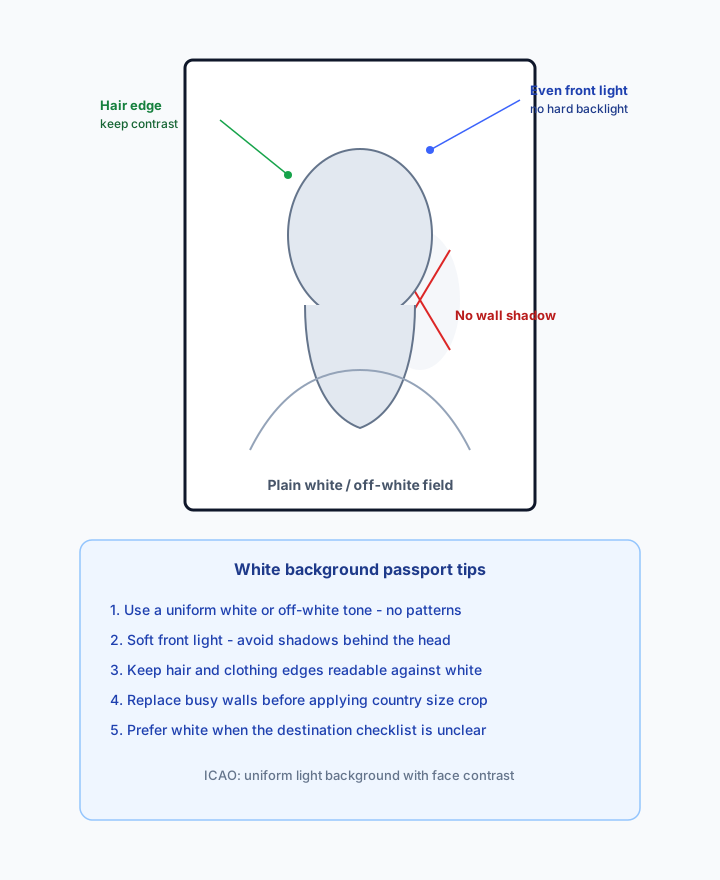
Plain white maximises contrast between face and backdrop so automated and human reviewers can verify identity. ICAO expects uniform light tones; India, the US, Canada, and many visa forms explicitly call for white or off-white.
Background removal for ID photos
Most passport and visa standards require a plain white or light background. Passprint removes walls, patterns, and shadows, then sizes and frames the portrait for the destination country — no manual masking in Photoshop while the counter queue grows.


Walk-in passport clients rarely bring a plain backdrop. Staff should not spend ten minutes per photo cloning walls in Photoshop when a queue is building. Passprint segments the subject, applies uniform white, and re-frames to country size in one credit. Passprint automates the entire workflow from upload to print-ready sheet in just a few clicks.
AI segments the subject and applies a uniform white or off-white background tuned for ID photo contrast requirements.
Background removal and reframing complete in one pass — your team reviews instead of retouching.
Head size and crop adjust after the background change so the final photo still meets passport dimensions.
ICAO Doc 9303 calls for uniform, light-coloured backgrounds that contrast with the face. Most national authorities specify white or near-white tones. Shadows, textures, and coloured walls are among the most common studio rejections — fix the backdrop before you lock millimetre crop.
| Spec | Plain white / off-white | Coloured studio paper | Busy walls / outdoors |
|---|---|---|---|
| Document acceptance | Preferred by most authorities | Only if the country allows that tone | Usually rejected |
| Face contrast | High, even contrast | Depends on paper colour vs skin tone | Low / uneven |
| Shadows behind head | Avoid — flatten with even light or replace | Still visible on coloured paper | Common fail |
| Hair / edge clarity | Needs soft light, not blown whites | May blend with similar tones | Lost in clutter |
| Studio fix path | AI white replace + country crop | Swap to white if rules require it | Remove & replace before sizing |
| Typical use | India, US, Canada, Schengen, many visas | UK cream/grey options; rare elsewhere | Walk-in phone photos |
Plain white maximises contrast between face and backdrop so automated and human reviewers can verify identity. ICAO expects uniform light tones; India, the US, Canada, and many visa forms explicitly call for white or off-white.
A white wall with a hard shadow behind the head still fails. Soft front light or AI background replacement produces a flat tone. Do not leave a grey crescent behind the shoulders.
Very light hair or white clothing can blend into a pure white field. Keep soft side fill so edges remain readable. Passprint’s removal preserves the subject silhouette before you pick the final white or off-white tone.
Some authorities accept light cream or grey (notably UK HMPO guidance). Passprint defaults to white and lets you pick grey or custom tones when the destination allows it. When in doubt, prefer white.
Background replacement is not a complete photo by itself. After white is applied, run India 35×45, US 2×2, Canada 50×70, UK, or Schengen sizing so face height matches the destination — then export a 300 DPI sheet.
Passprint provides sizing, cropping, and background standardisation for studio workflows. US State Department rules prohibit certain enhancements that change appearance — review local regulations for your market before heavy retouching.
Busy patterns, outdoor scenes, coloured walls, shadows, props, other people in frame, and uneven “patched” backgrounds from poor manual masks. Replacing the backdrop and re-checking framing prevents most of these.
Free accounts receive 3 credits every 72 hours. One credit runs AI processing including background removal and framing. Layout editing does not spend credits. See pricing below for Pro credit pools.
Need step-by-step instructions for swapping a phone photo to white? Use the how to change passport photo background to white guide, then return here for country pairing and studio export tips.
Upload a walk-in portrait, replace the background with white, and apply a country size preset. Layout editing stays free.
Start FreeHow it works
AI removes the existing background, applies compliant white, then sizes and frames the portrait for your client’s destination country.
Busy walls, outdoor backgrounds, or patterned backdrops are all acceptable inputs.
AI segments the subject and applies uniform white or off-white in one pass.
Pair background replacement with India, UK, US, Canada, or Schengen dimension presets.
Download a 300 DPI A4 layout once background and crop are confirmed.


Passport Size Photos
A4 · 210 × 297 mm · 35 × 45 mm
Busy walls, outdoor backgrounds, or patterned backdrops are all acceptable inputs.
AI segments the subject and applies uniform white or off-white in one pass.
Pair background replacement with India, UK, US, Canada, or Schengen dimension presets.
Download a 300 DPI A4 layout once background and crop are confirmed.
Passport Size Photos
A4 · 210 × 297 mm · 35 × 45 mm
AI segmentation and tone control for ID photos that require plain white or off-white backdrops.
AI removes walls and patterns, then applies uniform white tuned for ID contrast.
Head size and crop adjust after background removal so dimensions stay compliant.
Background removal completes in one pass — staff review instead of cloning in Photoshop.
Apply India, UK, US, or Schengen sizing after the background is standardised.
Switch to cream or light grey when a destination accepts tones beyond pure white.
Download 300 DPI sheets once background and sizing are confirmed.
ICAO Doc 9303 requires uniform, light-coloured backgrounds that contrast with the face. Most countries specify white or near-white tones. Pair background replacement with the correct country size before you print.
Official references
Passprint uses AI-assisted processing for background replacement, face framing, and sizing. Final acceptance is decided by the issuing authority — always verify against the official references on this page and inspect your printed sheet before submission.
Last reviewed: July 31, 2026
Pricing
Editing and layout stay on your plan. Credits cover AI: one credit per successful passport process or background cutout.
Compare
Every capability, side by side. Nothing hidden — Free, Pro, and Pro+ in one view.
Swipe to compare plans
| Features | Free ₹0 forever | Popular Pro ₹149 / month | Pro+ ₹379 / month |
|---|---|---|---|
| Credits & sessions | |||
| Credits | 3 every 72 hours | 100 every 30 days | 300 every 30 days |
| Clients per session | 1 | 3 | 5 |
| AI processing | |||
| AI background removal | Included | Included | Included |
| Background remover — transparent PNG cutouts | Included | Included | Included |
| Automatic face alignment | Included | Included | Included |
| ICAO-compliant passport framing | Included | Included | Included |
| Passport photo validation | Included | Included | Included |
| Standard passport & visa photo sizes | Included | Included | Included |
| Print-ready passport photos | Included | Included | Included |
| Multi-client processing & batch creation | Not included | Included | Included |
| Adjust photo & advanced editing | Not included | Included | Included |
| Advanced compliance & quality validation | Not included | Included | Included |
| Layout & export | |||
| Basic passport layout creation | Included | Included | Included |
| Directional copy placement on layout | Included | Included | Included |
| Copy presets | 3 copies | 3, 6, 8, 12, 16 | 3, 6, 8, 12, 16 |
| Page sizes | A4 | All sizes & custom | All sizes & custom |
| PNG, JPG & PDF download | Included | Included | Included |
| Print from layout | Not included | Included | Included |
| Full layout editor & background tools | Not included | Included | Included |
| Smart auto-align & advanced layout tools | Not included | Included | Included |
| Add clients in editor | Not included | Included | Included |
| Phone QR import in layout editor | Not included | Included | Included |
| History & reprints | |||
| Job history | 1 hour | 3 days | 7 days |
| Reprint from history | Not included | Included | Included |
| Support & billing | |||
| Support | Standard | Priority email | Priority email & chat |
| Billing & invoice management | Not included | Included | Included |
| Early access to new studio features | Not included | Not included | Included |
Prices follow the billing toggle above. 1 credit = 1 AI process (passport photo or cutout).
AI white-background replacement with passport sizing in one studio workflow.