

Why millimetres beat “looks about right”
Consulates and passport offices measure prints. An almost-correct crop that drifts by a millimetre can still fail. Passprint presets encode outer size so staff are not estimating with free-transform handles.
Photo dimensions hub
Millimetre and inch requirements are the top reason photos get rejected. These guides explain exact dimensions, pixel counts at 300 DPI, and which countries use each format.


Most countries outside the Americas use 35×45 mm. The United States standardised on 2×2 inch squares. Canada requires 50×70 mm with IRCC head-height rules. This hub is the navigational map for millimetres and inches — not a substitute for country narrative pages. Open a child size guide for annotated diagrams and pixel math, then jump to India, US, UK, or Canada when you need authority-specific rules. Passprint automates the entire workflow from upload to print-ready sheet in just a few clicks.
Used by India, the UK, Schengen states, and dozens of Asian and Middle Eastern countries for passport and many visa packs.
51×51 mm with strict head-height percentage for US passports and visas — never stretch a rectangle into this square.
Taller Canadian format with 31–36 mm face height — see the 50×70 mm size guide for IRCC-aligned crops.
Compare outer size, aspect ratio, approximate 300 DPI pixels, and typical markets, then open the detailed size page you need.
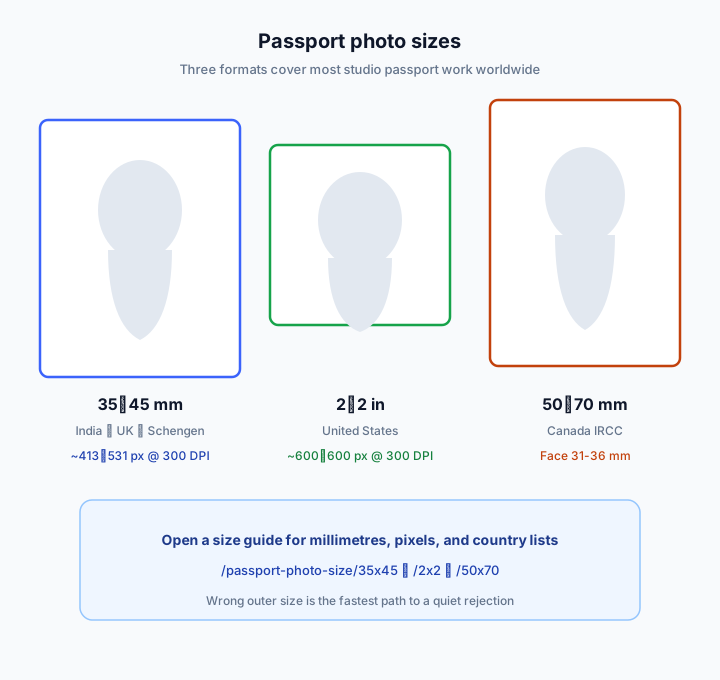
| Spec | 35×45 mm | 2×2 in (US) | 50×70 mm (Canada) |
|---|---|---|---|
| Millimetres | 35×45 | 51×51 | 50×70 |
| Aspect | 7:9 portrait | 1:1 square | 5:7 portrait |
| ~300 DPI pixels | 413×531 | 600×600 | 591×827 |
| Face-height focus | ~70–80% / local bands | 1–1⅜ in chin–crown | 31–36 mm chin–crown |
| Open size guide | 35×45 mm guide | 2×2 in guide | 50×70 mm guide |
Consulates and passport offices measure prints. An almost-correct crop that drifts by a millimetre can still fail. Passprint presets encode outer size so staff are not estimating with free-transform handles.
Open the 35×45 guide for annotated diagrams, country lists, and pixel notes. Pair it with India, UK, or Schengen pages when the application channel matters as much as the rectangle.
The 2×2 guide explains square framing and US head-size inches. Use it for US passport and US visa work; do not convert from 35×45 by stretching.
Canada’s taller format needs both correct outer size and the 31–36 mm face band. The 50×70 guide and Canada country page should be read together for IRCC jobs.
Studios printing on photo paper should think in 300 DPI. Digital portals may ask for different pixel caps — export sharp from Passprint, then downscale only when a form demands it.
This hub answers “which millimetres?”. The country hub answers “which authority?”. How-to pages answer “how do I shoot or crop?”. Keep those intents separate when you link clients or train staff.
ICAO Doc 9303 describes face occupancy as a percentage of image height. Countries may publish millimetre bands on top. See the ICAO hub when you need the international baseline.
Start with a standard 35×45 preset, or switch to 2×2 / 50×70 after upload.
Try Passprint freeMatch the destination form’s published dimensions. When unsure, open the child size guide and the matching country page.
Official references
Passprint uses AI-assisted processing for background replacement, face framing, and sizing. Final acceptance is decided by the issuing authority — always verify against the official references on this page and inspect your printed sheet before submission.
Last reviewed: July 31, 2026
Understand dimensions, then create compliant photos with Passprint.