Passprint

Passport photo dimensions

50×70 mm passport photos — Canada’s official size

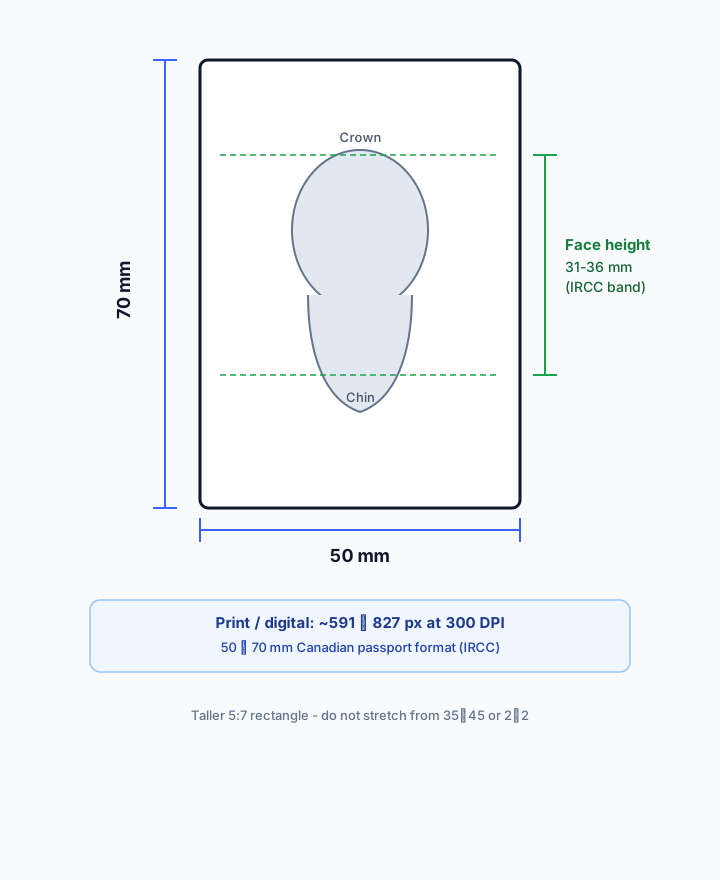
Fifty by seventy millimetres is the Canadian passport photo format. This guide covers physical dimensions, head-height millimetres, pixel math at 300 DPI, print tips, and how Passprint enforces a true 50×70 crop instead of stretching 35×45 images.

Exact 50×70 mm~591×827 px @ 300 DPICanada / IRCC
Passprint 50x70 mm passport photo size workflow: upload portrait, AI background removal, compliant sizing, and print-ready A4 sheet
Why 50×70 mm is different

Do not confuse Canada’s size with 35×45 mm
or US 2×2 inch squares

50×70 mm is a taller rectangle (aspect ~5:7). Face height is specified in millimetres (31–36 mm), not only as a vague percentage. Generic editors that only “make it look tall” fail when IRCC measures the print. Passprint automates the entire workflow from upload to print-ready sheet in just a few clicks.

Studio challenge

Millimetre-accurate 50×70 crop

Exports use 50 mm width and 70 mm height at 300 DPI — approximately 591×827 pixels — so rulers match the digital file.

01 / 03
Studio challenge

31–36 mm face height

Chin-to-crown distance is the critical Canadian check. Passprint’s Canada preset targets this band while keeping eyes in the upper portion of the frame.

02 / 03
Studio challenge

Print sheets with trim guides

Multiple 50×70 copies align on a grid so studio cutters produce clean pairs for passport applications.

03 / 03

Sizing workflow

How to create a 50×70 mm passport photo

Upload any portrait, apply the 50×70 mm Canada-aligned preset, verify head height, and export a 300 DPI print sheet.

1

Upload source portrait

Phone or studio camera — Passprint accepts JPEG and PNG with a clear, front-facing face.

Person taking a selfie to upload as passport photo
Upload Photo
2

Select 50×70 mm / Canada preset

Millimetre-accurate crop with face-height targeting for Canadian passport rules.

Portrait being AI-processed
Processing
3

Verify head dimensions

Confirm chin-to-crown sits between 31 and 36 mm before you spend a credit on export.

Processed passport photo with compliant background
Original selfie before processing
25 mm
35 mm ISO
35 mm
25 to 35 mm (50 to 69%)
4

Download print sheet

300 DPI layout with cutting guides for physical IRCC submissions.

For Print (A4).pdf300 DPI

Passport Size Photos

A4 · 210 × 297 mm · 50 × 70 mm

50×70 mm reference

Dimension tools for 50×70 mm.
Canada’s taller format, measured right.

Educational sizing for Canadian 50×70 mm photos plus Passprint presets that lock millimetres and face height.

~591×827px at 300 DPI
31–36mm face height
5×7cm equivalent
01
Sizing

Pixel-perfect 50×70 crop

Exports use 50 mm width and 70 mm height at 300 DPI — not stretched 35×45 ratios.

02
Framing

IRCC face-height band

Chin-to-crown targeting between 31 and 36 mm within the Canadian frame.

03
Presets

Canada workflow pairing

Open the Canada passport guide for full IRCC requirements alongside this size reference.

04
Layout

Print grid for 50×70

Multiple taller copies align for clean trimming on studio cutters.

05
Export

Print-ready export

300 DPI sheets ready for IRCC paper submissions.

06
Convert

Safe size conversion

Re-crop from other formats without distorting facial proportions.

50×70 mm FAQ

50×70 mm passport photo dimensions

The 50×70 mm format is required for Canadian passport photographs under Immigration, Refugees and Citizenship Canada (IRCC) guidance. It is not interchangeable with the 35×45 mm ISO/ICAO-common size used by India, the UK, and Schengen countries.

How many pixels is 50×70 mm at 300 DPI?

At 300 DPI, 50×70 mm is approximately 591×827 pixels (width × height). At 600 DPI it doubles. Passprint handles resolution on export so prints stay sharp when trimmed.

Which country uses 50×70 mm passport photos?

Canada is the primary market using 50×70 mm for passport photographs. Always confirm the latest IRCC photo page for digital vs printed submission rules.

What is the face height rule for 50×70 mm Canada photos?

IRCC specifies the face from chin to crown should measure 31–36 mm within the 50×70 mm frame. That is roughly 44–52% of the photo height — Passprint’s Canada preset encodes this band.

Can I convert a 35×45 photo to 50×70?

Not by stretching. Passprint re-crops the original portrait to 50×70 with correct head framing. Stretching a 35×45 image distorts facial proportions and risks rejection.

What background and print quality are expected?

Use a plain white or light background with even lighting and no shadows. Print on high-quality photo paper at 300 DPI. Soft, blurry, or heavily retouched images are commonly rejected.

Where can I read the full Canada passport photo guide?

Open the Canada passport photo page for IRCC-focused requirements, rejection reasons, and the studio workflow. This size page focuses on dimensions and pixel math.

Last reviewed: July 6, 2026

Need exact 50×70 mm photos? Try Passprint free.

Canadian dimensions, 31–36 mm face height, and 300 DPI print layouts — 3 free credits.