Passprint

US passport photo requirements

US passport photos at 2×2 inches — sized to State Department specs

Studios serving US passport applicants need consistent 2×2 inch output, correct head-centre framing, and plain backgrounds. Passprint automates each step from upload to printable sheet.

US 2×2 in preset300 DPI exportStudio A4 layouts
Passprint US passport photo 2x2 workflow: upload portrait, AI background removal, compliant sizing, and print-ready A4 sheet
For US passport workflows

2×2 inch photos without manual ruler work when head-size tolerance is measured in millimetres

US passport photos are rejected when head size drifts outside tolerance or backgrounds aren't plain. Passprint applies measurable Department of State framing so every print matches expectations. Pair this page with the passport photo maker and the crop passport photo guide when you need end-to-end control. Passprint automates the entire workflow from upload to print-ready sheet in just a few clicks.

Studio challenge

Head size within US tolerance

Face height and eye-line positioning follow common US passport framing guidelines — no manual overlay templates in Photoshop.

01 / 03
Studio challenge

Plain background, every time

Swap busy backgrounds to compliant white or off-white before your client submits a passport application.

02 / 03
Studio challenge

Print shop ready sheets

Export multiple 2×2 copies on letter or A4 with cutting ticks your staff can trim quickly at the counter.

03 / 03
US passport requirements

Department of State photo specs at a glance

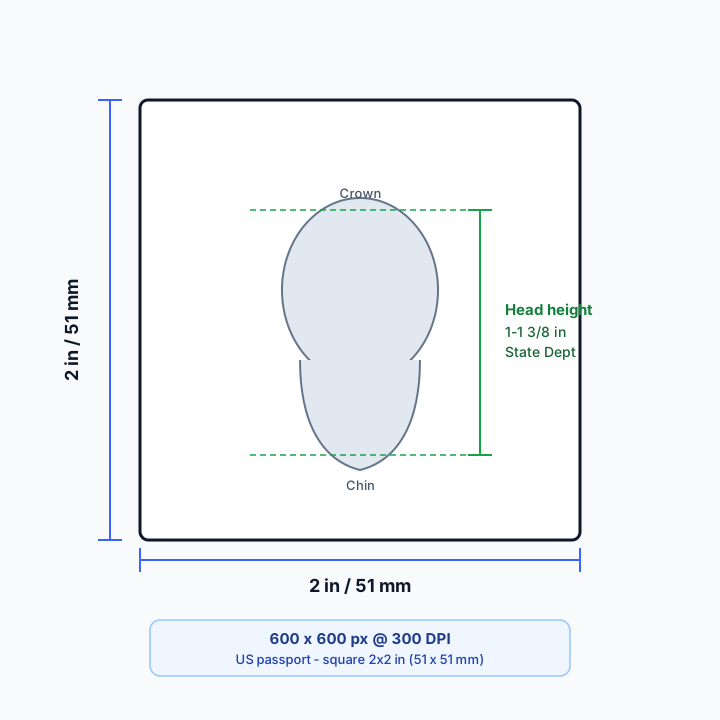
US passports use a square 2×2 inch format with an inch-based head-height band — not the rectangular 35×45 mm size used by India and the UK. Check the diagram before you crop.

Annotated US passport photo frame showing 2×2 inch size, State Department head height of 1 to 1⅜ inches, and 600×600 pixels at 300 DPI
US 2×2 in square frame with the State Department chin-to-crown band and 300 DPI pixel guidance.

US vs India/UK vs Canada

SpecUnited StatesIndia / UK (35×45)Canada (IRCC)
Outer size2×2 in (51×51 mm)35×45 mm50×70 mm
ShapeSquarePortrait rectangleTaller rectangle
Head / face height1–1⅜ in (25–35 mm)Country % or mm bands31–36 mm chin to crown
BackgroundWhite or off-whiteUsually plain white (IN) / cream–white (UK)White or light
300 DPI pixels (approx.)600×600 px413×531 px591×827 px

Dimensions, capture rules, and export for the US

Official dimensions

The Department of State requires a 2×2 inch (51×51 mm) square photo. That format is distinct from international 35×45 mm prints — never stretch a rectangular crop into a square. The 2×2 inch size guide covers millimetre and pixel math in depth.


Face height

Head height from chin to crown must measure between 1 and 1⅜ inches (25–35 mm) inside the square frame. Eyes sit near the horizontal midpoint of the photo. Passprint’s US preset targets this band with face detection.

Background

Use a plain white or off-white backdrop with even tone and no patterns or other people. Busy walls and coloured curtains are frequent rejection triggers. The white background guide covers AI replacement before you lock the 2×2 crop.

Lighting

Even front light keeps both sides of the face similar in brightness and reduces shadows on a white wall. Avoid strong backlight, heavy makeup filters, and flash hotspots. Shoot from eye level with headroom for the square crop.

Glasses

Current State Department guidance generally allows prescription glasses if there is no glare and the eyes remain fully visible. Tinted lenses and heavy frames that hide the eyes still fail. When unsure, remove glasses and re-check the latest official page.

Children and babies

Minors use the same 2×2 inch size. Infants may be photographed lying down against a plain white surface; keep blankets and adult hands out of frame. Capture a recent likeness with eyes open when practical and a neutral mouth.

Common rejection reasons

Typical failures include head height outside the 1–1⅜ inch band, tilted head, smile, glasses glare, shadows, low resolution, and stretched conversions from 35×45. Re-crop with the US preset instead of squashing a rectangle.

Print vs digital

Some renewals and walk-in appointments still need physical 2×2 prints; many online applications need a JPEG upload. Passport and visa portals can differ on file-size limits — see the US visa photo page for DS-160-oriented digital rules.

DPI and pixels

At 300 DPI, 2×2 inches is 600×600 pixels — the studio default for print sheets and most uploads. Start from a high-resolution portrait so framing stays sharp after crop. Pair with the ICAO guide when you need international face-position context beyond US inches.

How it works

How to create US passport photos

Square 2×2 inch crop, plain background, and print-ready export — sized for US passport applications and renewal portals.

1

Upload portrait

Accept walk-in photos from phones, booths, or DSLR — Passprint handles orientation and exposure.

Person taking a selfie to upload as passport photo
Upload Photo
2

Apply 2×2 preset

Automatic crop to 51×51 mm with US-appropriate head height and centred face position.

Portrait being AI-processed
Processing
3

Verify framing

Preview the square crop and background before final export.

Processed passport photo with compliant background
Original selfie before processing
25 mm
35 mm ISO
35 mm
25 to 35 mm (50 to 69%)
4

Download & print

Get a high-resolution file or full print sheet for your studio printer.

For Print (A4).pdf300 DPI

Passport Size Photos

A4 · 210 × 297 mm · 2 × 2 in

For users in the United States: The U.S. Department of State prohibits digital alterations of ID photographs. Our platform provides sizing and cropping services only and does not modify or enhance images.

US passport toolkit

2×2 inch US passport tools. Sized to State Department specs.

Square crop, head-height tolerance, and print layouts for US passport applicants.

2×2 inUS preset
51 mmSquare crop
300 DPIPrint output
01
Framing

US head-size framing

Face height and eye-line positioning aligned to common US passport photo guidelines.

02
Layout

2×2 multi-copy sheets

Lay out several square copies on Letter or A4 with cutting ticks for quick trimming.

03
Background

Plain background swap

Replace distracting backgrounds with white or off-white before submission.

04
Export

Digital + print export

JPEG for online renewal portals and 300 DPI sheets for in-person applications.

05
Studio

Job history & reprint

Reopen recent US passport jobs and reprint without reprocessing when clients return.

06
Billing

Pay per processing run

Credits consumed only when AI processes a portrait — layout editing stays free.

US passport FAQ

US passport photo size questions

The U.S. Department of State requires 2×2 inch (51×51 mm) photos with the head between 1 inch and 1⅜ inches (25–35 mm) from chin to top of hair.

Passprint uses AI-assisted processing for background replacement, face framing, and sizing. Final acceptance is decided by the issuing authority — always verify against the official references on this page and inspect your printed sheet before submission.

Last reviewed: July 31, 2026

Pricing

Plans built for every studio

Editing and layout stay on your plan. Credits cover AI: one credit per successful passport process or background cutout.

Free

₹0/ always free
3credits every 72 hours

1 client per session

Get started

Most popular

Pro

₹149/ month
100credits / month

Up to 3 clients per session

Get started

Pro+

399Save 5%
₹379/ month
300credits / month

Up to 5 clients per session

Get started

Compare

Compare plans in detail

Every capability, side by side. Nothing hidden — Free, Pro, and Pro+ in one view.

Swipe to compare plans

Features
Free
₹0 forever
Popular
Pro
₹149 / month
Pro+
₹379 / month
Credits & sessions
Credits3 every 72 hours100 every 30 days300 every 30 days
Clients per session135
AI processing
AI background removalIncludedIncludedIncluded
Background remover — transparent PNG cutoutsIncludedIncludedIncluded
Automatic face alignmentIncludedIncludedIncluded
ICAO-compliant passport framingIncludedIncludedIncluded
Passport photo validationIncludedIncludedIncluded
Standard passport & visa photo sizesIncludedIncludedIncluded
Print-ready passport photosIncludedIncludedIncluded
Multi-client processing & batch creationNot includedIncludedIncluded
Adjust photo & advanced editingNot includedIncludedIncluded
Advanced compliance & quality validationNot includedIncludedIncluded
Layout & export
Basic passport layout creationIncludedIncludedIncluded
Directional copy placement on layoutIncludedIncludedIncluded
Copy presets3 copies3, 6, 8, 12, 163, 6, 8, 12, 16
Page sizesA4All sizes & customAll sizes & custom
PNG, JPG & PDF downloadIncludedIncludedIncluded
Print from layoutNot includedIncludedIncluded
Full layout editor & background toolsNot includedIncludedIncluded
Smart auto-align & advanced layout toolsNot includedIncludedIncluded
Add clients in editorNot includedIncludedIncluded
Phone QR import in layout editorNot includedIncludedIncluded
History & reprints
Job history1 hour3 days7 days
Reprint from historyNot includedIncludedIncluded
Support & billing
SupportStandardPriority emailPriority email & chat
Billing & invoice managementNot includedIncludedIncluded
Early access to new studio featuresNot includedNot includedIncluded

Prices follow the billing toggle above. 1 credit = 1 AI process (passport photo or cutout).

Ship US 2×2 passport photos from your counter today.

Square crop, head-size framing, and multi-copy print sheets for walk-in applicants.