Passprint

2×2 inch standard

2×2 inch passport photos — square format, precise head size

The United States requires 2×2 inch (51×51 mm) square photos with the head measuring 1–1⅜ inches (25–35 mm) from chin to crown. This guide covers dimensions, pixels, and how Passprint applies head-size framing.

51×51 mm / 2×2 in600×600 px @ 300 DPIUS primary
Passprint 2x2 inch passport photo size workflow: upload portrait, AI background removal, compliant sizing, and print-ready A4 sheet
Square format challenges

Square crops are easy to get wrong when head height matters more than aspect ratio

Cropping to a square is not enough — US guidelines measure head height in inches. Passprint combines 51×51 mm dimensions with face-detection framing. Use this page with the US passport guide, the passport photo maker, and the crop how-to when you need end-to-end framing. Passprint automates the entire workflow from upload to print-ready sheet in just a few clicks.

Studio challenge

Head size within tolerance

Face detection centres the head and scales it to the percentage US passport and visa guidelines describe.

01 / 03
Studio challenge

Digital file for online forms

Export a JPEG at 600×600 pixels (300 DPI) for government portal uploads.

02 / 03
Studio challenge

Multi-copy print sheets

Lay out several 2×2 copies per page for walk-in studio clients who need prints immediately.

03 / 03
2×2 size reference

Annotated 2×2 inch diagram and size comparison

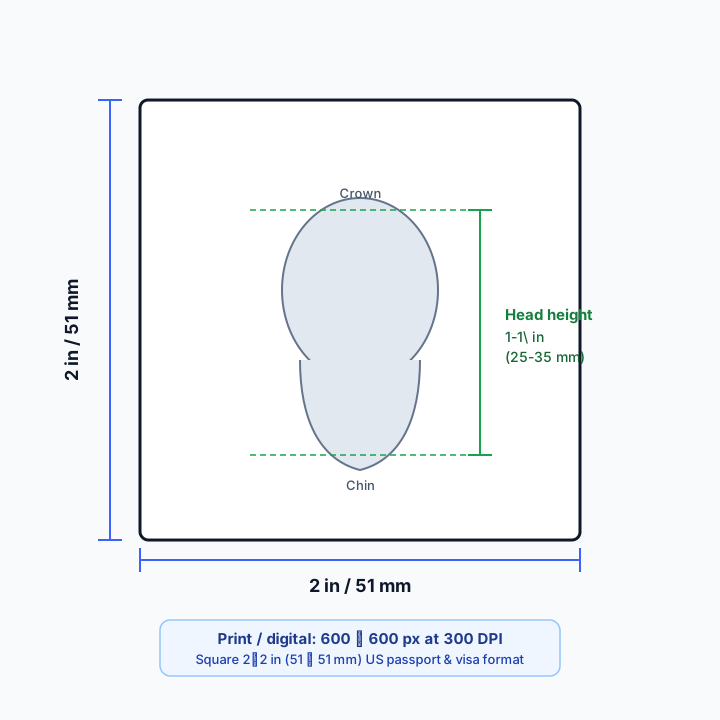
Use the diagram for millimetre, inch, and pixel checks, then compare 2×2 with the rectangular 35×45 mm and Canadian 50×70 mm standards before you crop.

Annotated 2×2 inch (51×51 mm) passport photo frame showing chin-to-crown head height of 1 to 1⅜ inches and 600×600 pixels at 300 DPI
2×2 in square frame with the US head-height band (chin to crown) and print/digital pixel guidance at 300 DPI.

2×2 vs 35×45 vs 50×70

Spec2×2 in (US)35×45 mm50×70 mm (Canada)
Outer size2×2 in (51×51 mm)35×45 mm50×70 mm
ShapeSquarePortrait rectangleTaller rectangle
Typical useUS passport & visaIndia, UK, Schengen, many othersCanadian passport
Head / face height1–1⅜ in (25–35 mm) chin to crownCountry % / mm bands (often ICAO-aligned)31–36 mm face height (IRCC)
300 DPI pixels (approx.)600×600 px413×531 px591×827 px
BackgroundPlain white or off-whiteUsually white / light plainPlain white or light

Background, lighting, rejections, and export specs

Background requirements

US passport and visa photos expect a plain white or off-white backdrop with even tone and no patterns, shadows, or other people in frame. Busy walls and coloured curtains are common rejection triggers. After capture, the white background guide explains how Passprint replaces imperfect walls with a uniform tone before you lock the 2×2 crop.


Lighting for a clean square crop

Even front light keeps both sides of the face similar in brightness and reduces chin or wall shadows that survive into the square frame. Avoid strong backlight and beauty filters. Shoot from eye level with a little headroom so the crop can meet the 1–1⅜ inch head band without cutting the crown or ears.

Common rejection reasons

Typical failures include head height outside the 1–1⅜ inch band, tilted head, smile or open mouth, glasses glare, shadows on a white wall, low resolution soft files, and stretched conversions from 35×45. Re-crop with correct framing instead of squashing a rectangle into a square — the crop passport photo guide covers that workflow.

Print vs digital requirements

Printed 2×2 photos should be sharp at 300 DPI on photo paper for counters and renewals that still use hard copies. Digital uploads (including many DS-160 flows) need a square JPEG that meets portal pixel and file-size limits — often around 600×600 px. Export once from Passprint, then downscale only if a form requires a smaller file.

Resolution and pixel guidance

At 300 DPI, 2×2 inches is 600×600 pixels. That is the practical studio default for print sheets and most online forms. Starting from a high-resolution portrait helps ICAO-style face framing stay sharp after crop. Pair this size guide with the ICAO guide when you need international framing context beyond US inch measurements.

2×2 workflow

How to create a 2×2 inch passport photo

Square 51×51 mm crop with US head-size rules — distinct from the rectangular 35×45 mm international standard. Finish in the passport photo maker when you need print layouts or batch sessions.

1

Upload portrait

Any well-lit photo from phone or studio camera.

Person taking a selfie to upload as passport photo
Upload Photo
2

Apply 2×2 preset

Square crop to 51×51 mm with head-height percentage for US documents.

Portrait being AI-processed
Processing
3

Check head-size band

Verify chin-to-crown distance before export.

Processed passport photo with compliant background
Original selfie before processing
25 mm
35 mm ISO
35 mm
25 to 35 mm (50 to 69%)
4

Export digital or print

JPEG for online forms or multi-copy A4/Letter print sheet.

For Print (A4).pdf300 DPI

Passport Size Photos

A4 · 210 × 297 mm · 2 × 2 in

For users in the United States: The U.S. Department of State prohibits digital alterations of ID photographs. Our platform provides sizing and cropping services only and does not modify or enhance images.

2×2 inch reference

Square format tools. Head size, not just square crop.

Understand 51×51 mm requirements and export with US-appropriate head-height framing.

51×51mm
600×600px at 300 DPI
USPrimary market
01
Framing

Head size within tolerance

Face detection scales the head to percentages described in US passport and visa guidelines.

02
Layout

Square print grids

Multiple 2×2 copies per Letter or A4 page with spacing for studio cutters.

03
Digital

Online form dimensions

Export JPEGs at pixel sizes government portals expect for digital upload.

04
Convert

Rectangular to square

Re-crop 35×45 portraits to 2×2 with correct head framing instead of stretching.

05
Background

Plain backgrounds

White or off-white replacement after square crop for compliant submissions.

06
Presets

US preset pairing

Pair the 2×2 size guide with the US passport or visa workflow for end-to-end processing.

2×2 inch FAQ

2×2 passport photo size explained

The 2×2 inch format is mandated by the U.S. Department of State for passports and visas. It differs from the 35×45 mm international standard in both shape and head-size measurement method.

Passprint uses AI-assisted processing for background replacement, face framing, and sizing. Final acceptance is decided by the issuing authority — always verify against the official references on this page and inspect your printed sheet before submission.

Last reviewed: July 31, 2026

Square 2×2 photos made simple. Start free.

51×51 mm crop with US head-size rules and digital export for online forms.