ICAO face framing
Auto-centre and scale the head so face height matches international guidance.
Passport photo how-to
Capture a clear, forward-facing portrait with even light and a plain backdrop — then use Passprint to crop, whiten the background, and export a print-ready sheet that matches country and ICAO rules.


Most at-home rejections come from shadows, head tilt, busy backgrounds, or standing too close to the wall — not from using a phone instead of a studio camera. Passprint automates the entire workflow from upload to print-ready sheet in just a few clicks.
A single overhead light or window behind you casts uneven shadows. Use soft front light and stand a step away from the backdrop so the wall stays clean.
Passport rules expect a neutral expression, both eyes open, and the face square to the camera. A slight head tilt is enough to fail ICAO framing checks.
Patterns, selfies with beauty mode, and heavy editing can get photos rejected. Capture a natural portrait; use Passprint for background and crop — not for changing your face.
Step-by-step
Set up light and space first, capture a clean portrait, then finish sizing and background online so the photo matches official requirements.
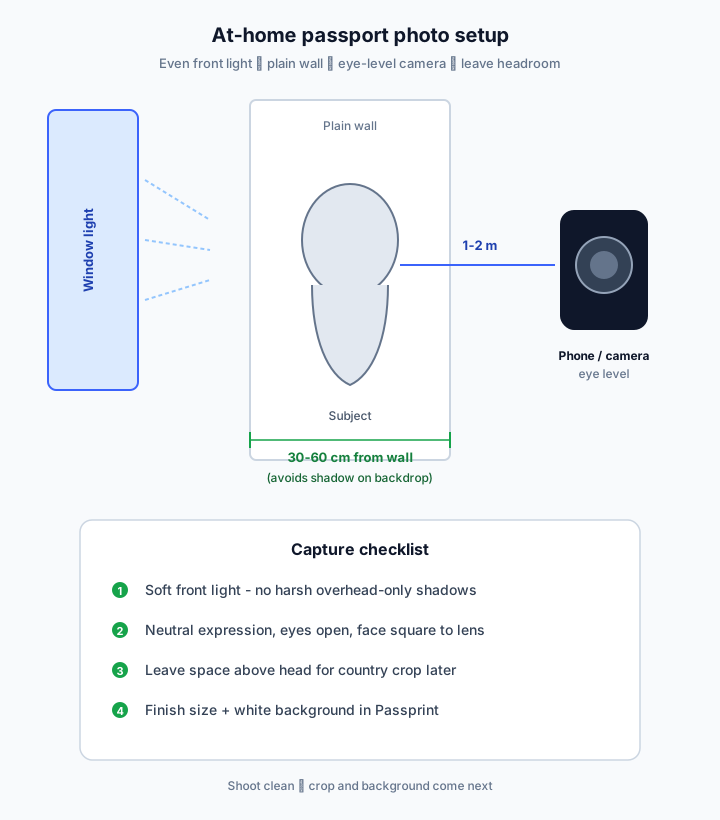
Pick a light, uncluttered wall. Stand 30–60 cm away so your shadow does not hit the backdrop. Clear shelves and posters from the frame.
Face a window or soft lamp. Avoid strong backlight and overhead-only lighting. Both sides of the face should look similarly bright with no hard shadows.
Remove hats and dark glasses (unless required for medical reasons). Keep shoulders square, chin level, eyes open, and a closed-mouth neutral expression.
Hold the phone or camera at eye height, about 1–2 metres away. Leave space above the head and below the shoulders so Passprint can crop to country size later.
Upload the best frame. Passprint applies country sizing, white background replacement, ICAO framing, and a 300 DPI print sheet — faster than manual DIY crops.


Passport Size Photos


A4 · 210 × 297 mm · 35 × 45 mm
Pick a light, uncluttered wall. Stand 30–60 cm away so your shadow does not hit the backdrop. Clear shelves and posters from the frame.

Face a window or soft lamp. Avoid strong backlight and overhead-only lighting. Both sides of the face should look similarly bright with no hard shadows.

Remove hats and dark glasses (unless required for medical reasons). Keep shoulders square, chin level, eyes open, and a closed-mouth neutral expression.


Hold the phone or camera at eye height, about 1–2 metres away. Leave space above the head and below the shoulders so Passprint can crop to country size later.
Passport Size Photos


A4 · 210 × 297 mm · 35 × 45 mm
Upload the best frame. Passprint applies country sizing, white background replacement, ICAO framing, and a 300 DPI print sheet — faster than manual DIY crops.
After you shoot a clean portrait, Passprint handles the parts that cause DIY rejections — size, white background, and print layout.
Auto-centre and scale the head so face height matches international guidance.
Replace imperfect home walls with uniform white after capture.
Multi-copy layouts with cutting guides at 300 DPI.
Yes, you can take a passport photo at home if lighting, pose, and final crop meet your country’s rules. Use Passprint after capture for sizing and white background.
Yes. Use the rear camera when possible, shoot at eye level in even light, and avoid beauty filters. Then upload to Passprint to crop to the correct size and apply a white background.
Soft, even light from the front — a bright window or two lamps at face height. Avoid flash that creates shiny skin and harsh wall shadows.
A plain light wall is enough for capture. Passprint can replace imperfect backgrounds with uniform white so the final photo meets most passport and ICAO background rules.
About 1–2 metres usually works: close enough for a sharp face, far enough to avoid distortion. Leave headroom so the crop can meet face-height percentages.
Everyday clothing that contrasts with a white background. Avoid uniforms that look like official costumes unless your country’s rules allow them, and skip white tops that blend into the backdrop.
Official references
Passprint uses AI-assisted processing for background replacement, face framing, and sizing. Final acceptance is decided by the issuing authority — always verify against the official references on this page and inspect your printed sheet before submission.
Last reviewed: July 30, 2026
Crop to country size, replace the background with white, and export a 300 DPI print sheet.